> ## Documentation Index
> Fetch the complete documentation index at: https://agenticadvertisingorg-feature-feedback.mintlify.site/llms.txt
> Use this file to discover all available pages before exploring further.
# Generative Creative
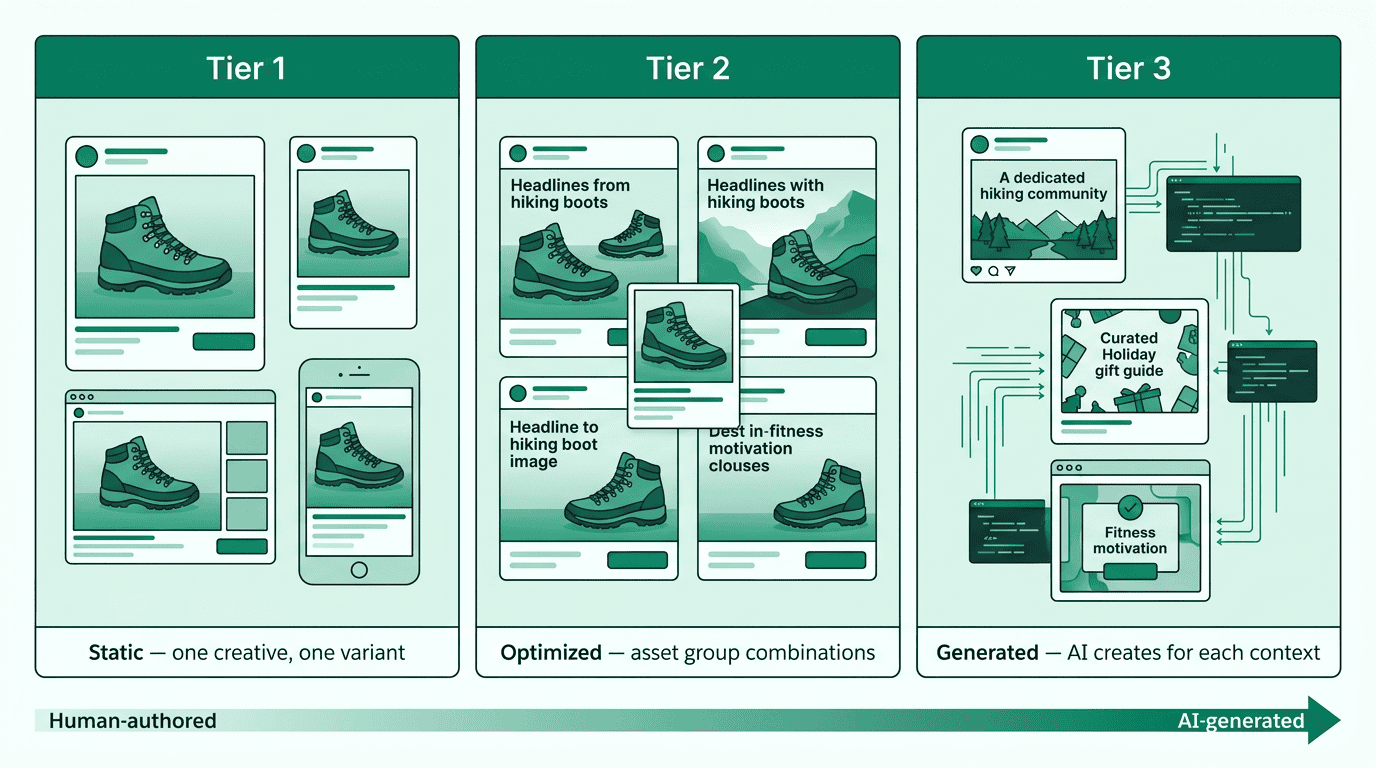
> Generative creative in AdCP uses AI to produce ad assets from a brief with three tiers: static manifests, asset group optimization, and per-context generation.
> **Canonical formats in 3.1**: in canonical formats, the "generative" category dissolves at the protocol level — production mechanism (generative AI, host recording, transcoding, asset rendering) is invisible to the buyer. Production source is declared per-canonical via `*_source` enums (`audio_source`, `image_source`, `video_source`, `item_production_model`); `synthesis_nondeterministic: true` flags Veo / Sora / Runway-class flows that need post-synthesis QA-loop semantics. See [canonical-formats](/dist/docs/3.1.0-rc.13/creative/canonical-formats) §"Two axes" for the canonical-formats model.
The Creative Protocol enables AI-powered creative generation and asset management for advertising campaigns. This guide will help you create your first creative in 5 minutes.
 > **Technical Reference**: This guide shows how to use the [`build_creative` task](/dist/docs/3.1.0-rc.13/creative/task-reference/build_creative). For complete API specifications, see the task reference documentation.
## Overview
The Creative Protocol provides AI-powered creative generation:
* **`build_creative`**: Generate creative content using AI with either static manifests or dynamic code
* **`preview_creative`**: Generate previews of creative manifests
* **`list_creative_formats`**: Discover supported creative formats
Assets are provided via [brand identity](/dist/docs/3.1.0-rc.13/brand-protocol/brand-json) - no separate asset library management needed.
## Quick Start: Generate Your First Creative
### Step 1: Basic Creative Generation
Here's the simplest possible request to generate a native display ad:
```json theme={null}
{
"message": "Create a simple ad for a coffee shop promotion - 20% off all drinks this week",
"target_format_id": {
"agent_url": "https://creative.adcontextprotocol.org",
"id": "display_native"
}
}
```
### Step 2: Understanding the Response
You'll receive a structured creative manifest:
```json theme={null}
{
"creative_manifest": {
"format_id": {
"agent_url": "https://creative.adcontextprotocol.org",
"id": "display_native"
},
"assets": {
"headline": {
"content": "20% Off All Drinks This Week!"
},
"description": {
"content": "Visit our cozy coffee shop and enjoy premium coffee at an unbeatable price."
},
"call_to_action": {
"content": "Visit Today"
}
}
}
}
```
### Step 3: Preview Your Creative
Preview the manifest to see what it looks like before iterating:
```json theme={null}
{
"request_type": "single",
"creative_manifest": {
"format_id": {
"agent_url": "https://creative.adcontextprotocol.org",
"id": "display_native"
},
"assets": {
"headline": {
"content": "20% Off All Drinks This Week!"
},
"description": {
"content": "Visit our cozy coffee shop and enjoy premium coffee at an unbeatable price."
},
"call_to_action": {
"content": "Visit Today"
}
}
}
}
```
The response includes a preview URL you can embed in an iframe. See [`preview_creative`](/dist/docs/3.1.0-rc.13/creative/task-reference/preview_creative) for device variants, batch preview, and output format options.
### Step 4: Refine Your Creative
Iterate by passing the previous output's `creative_manifest` back with a new `message`. Alternatively, update the brief asset (`assets.brief`) to change the creative direction — the brief is the buyer-owned source of truth for what the creative should be.
```json theme={null}
{
"message": "Make the headline more exciting and add urgency",
"target_format_id": {
"agent_url": "https://creative.adcontextprotocol.org",
"id": "display_native"
},
"creative_manifest": {
"format_id": {
"agent_url": "https://creative.adcontextprotocol.org",
"id": "display_native"
},
"assets": {
"headline": {
"content": "20% Off All Drinks This Week!"
}
}
}
}
```
## Common Patterns
### Using brand identity
Provide brand context for better creative generation:
```json theme={null}
{
"message": "Create a display ad for our coffee shop promotion",
"target_format_id": {
"agent_url": "https://creative.adcontextprotocol.org",
"id": "display_300x250"
},
"brand": {
"domain": "mycoffeeshop.com"
}
}
```
**Minimal brand reference**: Start with just a domain for low-friction creative generation:
```json theme={null}
{
"message": "Create a coffee shop ad",
"target_format_id": {
"agent_url": "https://creative.adcontextprotocol.org",
"id": "display_native"
},
"brand": {
"domain": "mycoffeeshop.com"
}
}
```
See [brand.json reference](/dist/docs/3.1.0-rc.13/brand-protocol/brand-json) for comprehensive examples.
### Using Your Own Assets
Provide existing assets to incorporate into the creative:
```json theme={null}
{
"message": "Create a display ad featuring our signature latte",
"target_format_id": {
"agent_url": "https://creative.adcontextprotocol.org",
"id": "display_300x250"
},
"creative_manifest": {
"format_id": {
"agent_url": "https://creative.adcontextprotocol.org",
"id": "display_300x250"
},
"assets": {
"brand_logo": {
"url": "https://mycoffeeshop.com/assets/logo.png",
"width": 200,
"height": 50
}
}
}
}
```
### Generating Dynamic Code
The creative agent decides whether to return a static manifest or dynamic code based on the brief's requirements. When the creative requires runtime logic — like weather-responsive behavior, time-of-day adaptation, or location-based content — the agent returns executable code in the manifest's assets.
Use a descriptive brief that implies dynamic behavior:
```json theme={null}
{
"message": "Create a weather-responsive coffee ad that shows hot drinks when cold, iced drinks when warm",
"target_format_id": {
"agent_url": "https://creative.adcontextprotocol.org",
"id": "display_native"
}
}
```
Code-based creatives are indicated by the asset structure in the response — the manifest includes code assets alongside or instead of static content:
```json theme={null}
{
"creative_manifest": {
"format_id": {
"agent_url": "https://creative.adcontextprotocol.org",
"id": "display_native"
},
"assets": {
"code": {
"content": ""
},
"headline_warm": {
"content": "Cool Down with Our Iced Collection"
},
"headline_cold": {
"content": "Warm Up with Our Signature Roasts"
}
}
}
}
```
### Attaching creatives to a media buy
Once you've built and previewed your creative, attach it to a media buy. Pass the manifest from `build_creative` as a creative in `create_media_buy` (see [`create_media_buy`](/dist/docs/3.1.0-rc.13/media-buy/task-reference/create_media_buy) for the full request structure):
```json theme={null}
{
"packages": [{
"product_id": "premium_display",
"pricing_option_id": "cpm_standard",
"budget": 10000,
"creatives": [{
"creative_id": "coffee_promo_v3",
"name": "Coffee shop 20% off - final",
"format_id": {
"agent_url": "https://creative.adcontextprotocol.org",
"id": "display_native"
},
"assets": {
"headline": {
"content": "This Week Only: 20% Off Every Drink!"
},
"description": {
"content": "Visit our cozy coffee shop and enjoy premium coffee at an unbeatable price."
},
"call_to_action": {
"content": "Visit Today"
}
}
}]
}]
}
```
For sellers with [inline creative management](/dist/docs/3.1.0-rc.13/creative/sales-agent-creative-capabilities), creatives travel with the media buy. For other workflows, use [`sync_creatives`](/dist/docs/3.1.0-rc.13/creative/task-reference/sync_creatives) to upload creatives to the sales agent's library before referencing them in a media buy.
## Format Discovery
### Standard Formats
Common format IDs you can use immediately:
* `display_native` - Native advertising format
* `display_300x250` - Medium rectangle banner
* `video_standard_30s` - 30-second video ad
### Publisher-Specific Formats
For custom publisher formats, specify the source:
```json theme={null}
{
"message": "Create a premium video ad",
"target_format_id": {
"agent_url": "https://premium-publisher.com",
"id": "premium_video_15s"
}
}
```
## Seller-side generation (brief in media buy)
The examples above use `build_creative` to generate creatives interactively. A different pattern applies when the seller generates creatives at serve time — contextual ads, page-matched display, or AI-generated native.
In this flow, the sales agent implements both the Media Buy Protocol and the Creative Protocol. The buyer provides a brief as part of `create_media_buy`, and the seller generates creatives at serve time without any separate `build_creative` call.
### How it works
1. **Discover generative formats** — Call `list_creative_formats` on the sales agent. Look for formats where `format_id.agent_url` points to the sales agent itself.
2. **Submit brief in media buy** — Include a creative with the brief as an asset:
```json theme={null}
{
"packages": [{
"product_id": "premium_display",
"pricing_option_id": "cpm_standard",
"budget": 50000,
"creatives": [{
"creative_id": "brand_contextual_brief",
"name": "Contextual campaign brief",
"format_id": {
"agent_url": "https://ads.seller-example.com",
"id": "contextual_display_generative"
},
"assets": {
"brief": {
"content": "Highlight our sustainability story. Match tone to editorial context. Avoid competitor comparisons."
}
}
}]
}]
}
```
3. **Preview before launch** — Call `preview_creative` on the sales agent with the brief manifest and `context_description` inputs to see representative samples of what the agent will generate. Use `quality: "draft"` for fast iteration, `quality: "production"` for stakeholder review. These are illustrative — real output depends on live signals at serve time.
```json theme={null}
{
"request_type": "single",
"quality": "draft",
"creative_manifest": {
"format_id": {
"agent_url": "https://ads.seller-example.com",
"id": "contextual_display_generative"
},
"assets": {
"brief": {
"content": "Highlight our sustainability story. Match tone to editorial context. Avoid competitor comparisons."
}
}
},
"inputs": [
{ "name": "Tech article", "context_description": "Article about semiconductor manufacturing" },
{ "name": "Travel blog", "context_description": "Blog post about eco-friendly travel" }
]
}
```
Preview doesn't require the media buy to be active — you can preview with just the brief manifest before calling `create_media_buy`. See [Previewing generative creative](/dist/docs/3.1.0-rc.13/creative/task-reference/preview_creative#previewing-generative-creative) for the full mental model.
4. **Seller generates at serve time** — The seller uses the brief plus the buyer's [brand identity](/dist/docs/3.1.0-rc.13/brand-protocol/brand-json) to generate page-tailored creatives per impression or per page context. The brief and brand identity act as guardrails — the agent generates within these constraints. No buyer action is required for ongoing generation.
5. **Review generated variants** — Call `get_creative_delivery` on the sales agent (it implements the Creative Protocol) to see what was generated, including variant manifests and generation context:
```json theme={null}
{
"media_buy_ids": ["mb_12345"],
"max_variants": 20
}
```
The response includes variant-level manifests showing exactly what was served, along with the generation context (page topic, device class, etc.).
**Variant retention**: Agents are not required to retain variant data indefinitely. When calling `get_creative_delivery`, use `max_variants` to control how many variants are returned per creative. Agents select which variants to return based on their own criteria — typically by impression volume (most-served first), but some may use recency or representative sampling. For high-volume generative campaigns, expect that only a subset of all generated variants is retained. Request `max_variants` early and often during the campaign rather than relying on a single post-flight pull.
### Key differences from `build_creative`
| Aspect | `build_creative` | Brief in media buy |
| ----------------------- | -------------------------------------------------------------- | ---------------------------------------------------------------------- |
| When generation happens | On demand, before campaign starts | At serve time, throughout campaign |
| Who generates | Standalone creative agent or sales agent | Sales agent (integrated) |
| Pre-launch preview | Immediate (manifest is the creative) | Representative samples (brief + simulated context) |
| Buyer interaction | Interactive — review, iterate, approve | Preview samples, then set-and-forget — brief is the ongoing constraint |
| Variant visibility | Immediate (returned in response) | After serving (via `get_creative_delivery`) |
| Format authority | `format_id.agent_url` points to the agent that owns the format | `format_id.agent_url` is the sales agent itself |
See [Creative capabilities on sales agents](/dist/docs/3.1.0-rc.13/creative/sales-agent-creative-capabilities) for the full pattern.
### Guardrails for serve-time generation
When the seller generates creatives at serve time, the buyer's controls are:
* **The brief** — explicit instructions on tone, topics, exclusions ("Avoid competitor comparisons")
* **Brand identity** — colors, logos, voice guidelines, approved assets via [brand.json](/dist/docs/3.1.0-rc.13/brand-protocol/brand-json)
* **Pre-flight preview** — sample what the agent generates across contexts before launch
* **Post-flight audit** — review variant manifests and generation context via `get_creative_delivery`, replay specific variants via `preview_creative` variant mode
If post-flight review reveals off-brand variants, update the brief with more specific constraints and re-submit via `create_media_buy`. For regulated categories (financial services, pharma), include compliance requirements in the brief — agents that declare `supports_compliance: true` in their creative capabilities validate disclosures and required elements during generation.
## Conversational and interactive formats
Some generative formats are stateful — AI chat, interactive experiences, conversational native ads. These follow the same brief-in-media-buy pattern but have unique characteristics worth understanding.
### Format discovery
A conversational format in `list_creative_formats` might look like:
```json theme={null}
{
"format_id": {
"agent_url": "https://ads.seller-example.com",
"id": "conversational_native"
},
"name": "Conversational native ad",
"type": "native",
"description": "AI-powered conversational ad that responds to user messages within the content feed. Adapts tone and recommendations based on conversation context."
}
```
### Brief structure
The brief for a conversational format includes persona, topic boundaries, and guardrails:
```json theme={null}
{
"packages": [{
"product_id": "premium_native",
"pricing_option_id": "cpm_engaged",
"budget": 25000,
"creatives": [{
"creative_id": "brand_chat_brief",
"name": "Product advisor chat",
"format_id": {
"agent_url": "https://ads.seller-example.com",
"id": "conversational_native"
},
"assets": {
"brief": {
"content": "Act as a helpful product advisor for our outdoor gear line. Recommend products based on the user's activity interests. Keep responses concise (2-3 sentences). Never discuss competitor products. Always include a product link when recommending."
}
}
}]
}]
}
```
### Previewing conversations
Pre-flight previews for conversational formats produce a representative first interaction. Use `context_description` to simulate different entry points:
```json theme={null}
{
"request_type": "batch",
"quality": "production",
"requests": [
{
"creative_manifest": {
"format_id": {
"agent_url": "https://ads.seller-example.com",
"id": "conversational_native"
},
"assets": {
"brief": {
"content": "Act as a helpful product advisor for our outdoor gear line. Recommend products based on the user's activity interests."
}
}
},
"inputs": [
{ "name": "Hiking enthusiast", "context_description": "User reading an article about day hikes near Portland" },
{ "name": "Runner", "context_description": "User browsing a running shoe review page" }
]
}
]
}
```
When the preview response includes an `interactive_url`, reviewers can interact with the experience directly in a sandbox — testing different conversation paths, verifying guardrails, and checking tone.
**Testing guardrails**: Include adversarial contexts in your preview inputs to verify the agent respects brief constraints:
```json theme={null}
{
"inputs": [
{ "name": "Competitor question", "context_description": "User asks which brand makes better hiking boots than yours" },
{ "name": "Off-topic request", "context_description": "User asks for medical advice about a knee injury" },
{ "name": "Price haggling", "context_description": "User asks for a discount code or tries to negotiate pricing" }
]
}
```
Review these previews carefully — they reveal how the agent handles edge cases that the happy-path previews won't surface.
For conversational formats, the preview response may include an `interactive_url` where reviewers can test the conversation live:
```json theme={null}
{
"response_type": "single",
"previews": [
{
"preview_id": "prev_hiker",
"renders": [
{
"render_id": "render_1",
"output_format": "url",
"preview_url": "https://ads.seller-example.com/preview/conv_hiker_001",
"role": "primary"
}
],
"input": { "name": "Hiking enthusiast", "context_description": "User reading an article about day hikes near Portland" }
}
],
"interactive_url": "https://ads.seller-example.com/sandbox/conv_hiker_001",
"expires_at": "2026-04-01T00:00:00Z"
}
```
The `interactive_url` provides a sandbox where reviewers can have a real conversation with the agent, testing different paths and verifying guardrails interactively. Static previews show a representative first interaction; the sandbox shows how the agent actually behaves.
### Variant manifests for conversations
After the campaign runs, `get_creative_delivery` returns variant manifests that capture what the agent produced. For conversational formats, each variant represents a conversation session:
```json theme={null}
{
"variant_id": "conv_hiker_session_042",
"generation_context": {
"context_type": "conversational",
"topic": "outdoor recreation, hiking gear",
"device_class": "mobile",
"ext": {
"turn_count": 4,
"engagement_duration_seconds": 45
}
},
"manifest": {
"format_id": {
"agent_url": "https://ads.seller-example.com",
"id": "conversational_native"
},
"assets": {
"greeting": {
"asset_type": "text",
"content": "Planning a hike? I can help you find the right gear for the trail."
},
"transcript": {
"asset_type": "text",
"content": "Agent: Planning a hike? I can help you find the right gear for the trail.\nUser: Looking for a lightweight daypack\nAgent: For day hikes near Portland, I'd recommend our TrailLite 22L — it's 380g with a built-in rain cover. [link]\nUser: What about trekking poles?\nAgent: The CompactTrek poles fold to 36cm and weigh just 240g per pair. Great for the elevation changes on trails like Dog Mountain. [link]"
},
"products_shown": {
"asset_type": "text",
"content": "TrailLite 22L Daypack, CompactTrek Folding Poles"
}
}
},
"impressions": 1,
"clicks": 2
}
```
The level of detail in variant manifests depends on the agent. Some provide full transcripts (as shown above), others provide summarized exchanges with anonymized user signals. The key is that the buyer can audit what the brand's AI said to users.
### Session management and data handling
Conversational formats raise considerations that static ads do not:
* **Turn limits**: Include turn or duration limits in the brief ("End the conversation gracefully after 5 exchanges"). Agents may also enforce their own limits — check the format description in `list_creative_formats`.
* **Escalation**: Define what the agent should do when it cannot answer ("If the user asks about returns, provide a link to our help center"). Without explicit guidance, agent behavior on out-of-scope questions is undefined.
* **User data in transcripts**: Variant manifests from `get_creative_delivery` may include user messages. For regulated industries, confirm the agent's data handling practices (anonymization, retention limits) before launch.
* **Cost implications**: Conversational ads with per-engagement or per-turn pricing can have variable costs. Review the product's pricing model in `get_products` to understand how conversation depth affects spend.
These constraints are expressed in natural language in the brief. The protocol does not enforce them at runtime — verify compliance through post-flight variant review via [`get_creative_delivery`](/dist/docs/3.1.0-rc.13/creative/task-reference/get_creative_delivery).
See [Previewing generative creative](/dist/docs/3.1.0-rc.13/creative/task-reference/preview_creative#conversational-and-interactive-formats) for the full mental model on previewing stateful formats.
## Next steps
* **Multi-format generation**: Generate creatives for multiple sizes in one call with `target_format_ids` — see [Multi-format generation](/dist/docs/3.1.0-rc.13/creative/task-reference/build_creative#multi-format-generation)
* **Browse examples**: See [Task reference](/dist/docs/3.1.0-rc.13/creative/task-reference/build_creative) for `build_creative` examples
* **Sales agent creative flow**: See [Creative capabilities on sales agents](/dist/docs/3.1.0-rc.13/creative/sales-agent-creative-capabilities) for seller-side generation
* **Delivery reporting**: See [get\_creative\_delivery](/dist/docs/3.1.0-rc.13/creative/task-reference/get_creative_delivery) for variant-level analytics
## Common Issues
### Format Not Found
If you get a format error, the publisher may not support that format. Try:
1. Use a standard AdCP format first (`display_native`, `video_standard_30s`)
2. Check the publisher's `list_creative_formats` endpoint
3. Verify the `format_id.agent_url` is correct
### Understanding the quality model
Creative quality has two independent axes:
* **Build quality** (`quality` on `build_creative`): Controls generation fidelity — how much compute goes into producing the creative. `draft` produces rough concepts fast (lower-resolution images, simplified layouts). `production` produces polished, final-quality output.
* **Preview quality** (`quality` on `preview_creative`, `preview_quality` on `build_creative`): Controls render fidelity — how the creative is visualized for review. `draft` produces fast, lower-fidelity renderings for rapid iteration. `production` produces full-quality renderings for stakeholder review.
These axes are independent. Common combinations:
| Build | Preview | Use case |
| ---------- | ---------- | ------------------------------------------------------------------------------- |
| draft | draft | Rapid exploration — fast concepts, fast previews |
| draft | production | Stakeholder review of rough concepts — full-quality rendering of draft creative |
| production | production | Final review — polished creative, polished preview |
| production | draft | Thumbnail grid — final creative shown as quick thumbnails for selection |
Agents that support only one quality level silently ignore the parameter they don't support. There is no echo-back field — verify quality by inspection.
### Creative Quality Issues
To improve creative output:
1. **Build quality** and **preview quality** are independent axes — see [Understanding the quality model](#understanding-the-quality-model) above. Use `draft` for iteration, `production` for final review.
2. Be more specific in your message: "Create a minimalist coffee ad with earth tones"
3. Provide comprehensive brand identity with assets and guidelines
4. Iterate using [refinement](/dist/docs/3.1.0-rc.13/creative/task-reference/build_creative#iterative-refinement) — pass back the manifest with a new message, or update the brief asset
### Asset Management
Assets are provided via [brand identity](/dist/docs/3.1.0-rc.13/brand-protocol/brand-json):
1. Include assets in brand identity with descriptive tags
2. Use `asset_filters` in requests to select specific assets
3. Reference product catalogs for large inventories
Ready to create your first creative? Start with the basic example above and explore from there!
> **Technical Reference**: This guide shows how to use the [`build_creative` task](/dist/docs/3.1.0-rc.13/creative/task-reference/build_creative). For complete API specifications, see the task reference documentation.
## Overview
The Creative Protocol provides AI-powered creative generation:
* **`build_creative`**: Generate creative content using AI with either static manifests or dynamic code
* **`preview_creative`**: Generate previews of creative manifests
* **`list_creative_formats`**: Discover supported creative formats
Assets are provided via [brand identity](/dist/docs/3.1.0-rc.13/brand-protocol/brand-json) - no separate asset library management needed.
## Quick Start: Generate Your First Creative
### Step 1: Basic Creative Generation
Here's the simplest possible request to generate a native display ad:
```json theme={null}
{
"message": "Create a simple ad for a coffee shop promotion - 20% off all drinks this week",
"target_format_id": {
"agent_url": "https://creative.adcontextprotocol.org",
"id": "display_native"
}
}
```
### Step 2: Understanding the Response
You'll receive a structured creative manifest:
```json theme={null}
{
"creative_manifest": {
"format_id": {
"agent_url": "https://creative.adcontextprotocol.org",
"id": "display_native"
},
"assets": {
"headline": {
"content": "20% Off All Drinks This Week!"
},
"description": {
"content": "Visit our cozy coffee shop and enjoy premium coffee at an unbeatable price."
},
"call_to_action": {
"content": "Visit Today"
}
}
}
}
```
### Step 3: Preview Your Creative
Preview the manifest to see what it looks like before iterating:
```json theme={null}
{
"request_type": "single",
"creative_manifest": {
"format_id": {
"agent_url": "https://creative.adcontextprotocol.org",
"id": "display_native"
},
"assets": {
"headline": {
"content": "20% Off All Drinks This Week!"
},
"description": {
"content": "Visit our cozy coffee shop and enjoy premium coffee at an unbeatable price."
},
"call_to_action": {
"content": "Visit Today"
}
}
}
}
```
The response includes a preview URL you can embed in an iframe. See [`preview_creative`](/dist/docs/3.1.0-rc.13/creative/task-reference/preview_creative) for device variants, batch preview, and output format options.
### Step 4: Refine Your Creative
Iterate by passing the previous output's `creative_manifest` back with a new `message`. Alternatively, update the brief asset (`assets.brief`) to change the creative direction — the brief is the buyer-owned source of truth for what the creative should be.
```json theme={null}
{
"message": "Make the headline more exciting and add urgency",
"target_format_id": {
"agent_url": "https://creative.adcontextprotocol.org",
"id": "display_native"
},
"creative_manifest": {
"format_id": {
"agent_url": "https://creative.adcontextprotocol.org",
"id": "display_native"
},
"assets": {
"headline": {
"content": "20% Off All Drinks This Week!"
}
}
}
}
```
## Common Patterns
### Using brand identity
Provide brand context for better creative generation:
```json theme={null}
{
"message": "Create a display ad for our coffee shop promotion",
"target_format_id": {
"agent_url": "https://creative.adcontextprotocol.org",
"id": "display_300x250"
},
"brand": {
"domain": "mycoffeeshop.com"
}
}
```
**Minimal brand reference**: Start with just a domain for low-friction creative generation:
```json theme={null}
{
"message": "Create a coffee shop ad",
"target_format_id": {
"agent_url": "https://creative.adcontextprotocol.org",
"id": "display_native"
},
"brand": {
"domain": "mycoffeeshop.com"
}
}
```
See [brand.json reference](/dist/docs/3.1.0-rc.13/brand-protocol/brand-json) for comprehensive examples.
### Using Your Own Assets
Provide existing assets to incorporate into the creative:
```json theme={null}
{
"message": "Create a display ad featuring our signature latte",
"target_format_id": {
"agent_url": "https://creative.adcontextprotocol.org",
"id": "display_300x250"
},
"creative_manifest": {
"format_id": {
"agent_url": "https://creative.adcontextprotocol.org",
"id": "display_300x250"
},
"assets": {
"brand_logo": {
"url": "https://mycoffeeshop.com/assets/logo.png",
"width": 200,
"height": 50
}
}
}
}
```
### Generating Dynamic Code
The creative agent decides whether to return a static manifest or dynamic code based on the brief's requirements. When the creative requires runtime logic — like weather-responsive behavior, time-of-day adaptation, or location-based content — the agent returns executable code in the manifest's assets.
Use a descriptive brief that implies dynamic behavior:
```json theme={null}
{
"message": "Create a weather-responsive coffee ad that shows hot drinks when cold, iced drinks when warm",
"target_format_id": {
"agent_url": "https://creative.adcontextprotocol.org",
"id": "display_native"
}
}
```
Code-based creatives are indicated by the asset structure in the response — the manifest includes code assets alongside or instead of static content:
```json theme={null}
{
"creative_manifest": {
"format_id": {
"agent_url": "https://creative.adcontextprotocol.org",
"id": "display_native"
},
"assets": {
"code": {
"content": ""
},
"headline_warm": {
"content": "Cool Down with Our Iced Collection"
},
"headline_cold": {
"content": "Warm Up with Our Signature Roasts"
}
}
}
}
```
### Attaching creatives to a media buy
Once you've built and previewed your creative, attach it to a media buy. Pass the manifest from `build_creative` as a creative in `create_media_buy` (see [`create_media_buy`](/dist/docs/3.1.0-rc.13/media-buy/task-reference/create_media_buy) for the full request structure):
```json theme={null}
{
"packages": [{
"product_id": "premium_display",
"pricing_option_id": "cpm_standard",
"budget": 10000,
"creatives": [{
"creative_id": "coffee_promo_v3",
"name": "Coffee shop 20% off - final",
"format_id": {
"agent_url": "https://creative.adcontextprotocol.org",
"id": "display_native"
},
"assets": {
"headline": {
"content": "This Week Only: 20% Off Every Drink!"
},
"description": {
"content": "Visit our cozy coffee shop and enjoy premium coffee at an unbeatable price."
},
"call_to_action": {
"content": "Visit Today"
}
}
}]
}]
}
```
For sellers with [inline creative management](/dist/docs/3.1.0-rc.13/creative/sales-agent-creative-capabilities), creatives travel with the media buy. For other workflows, use [`sync_creatives`](/dist/docs/3.1.0-rc.13/creative/task-reference/sync_creatives) to upload creatives to the sales agent's library before referencing them in a media buy.
## Format Discovery
### Standard Formats
Common format IDs you can use immediately:
* `display_native` - Native advertising format
* `display_300x250` - Medium rectangle banner
* `video_standard_30s` - 30-second video ad
### Publisher-Specific Formats
For custom publisher formats, specify the source:
```json theme={null}
{
"message": "Create a premium video ad",
"target_format_id": {
"agent_url": "https://premium-publisher.com",
"id": "premium_video_15s"
}
}
```
## Seller-side generation (brief in media buy)
The examples above use `build_creative` to generate creatives interactively. A different pattern applies when the seller generates creatives at serve time — contextual ads, page-matched display, or AI-generated native.
In this flow, the sales agent implements both the Media Buy Protocol and the Creative Protocol. The buyer provides a brief as part of `create_media_buy`, and the seller generates creatives at serve time without any separate `build_creative` call.
### How it works
1. **Discover generative formats** — Call `list_creative_formats` on the sales agent. Look for formats where `format_id.agent_url` points to the sales agent itself.
2. **Submit brief in media buy** — Include a creative with the brief as an asset:
```json theme={null}
{
"packages": [{
"product_id": "premium_display",
"pricing_option_id": "cpm_standard",
"budget": 50000,
"creatives": [{
"creative_id": "brand_contextual_brief",
"name": "Contextual campaign brief",
"format_id": {
"agent_url": "https://ads.seller-example.com",
"id": "contextual_display_generative"
},
"assets": {
"brief": {
"content": "Highlight our sustainability story. Match tone to editorial context. Avoid competitor comparisons."
}
}
}]
}]
}
```
3. **Preview before launch** — Call `preview_creative` on the sales agent with the brief manifest and `context_description` inputs to see representative samples of what the agent will generate. Use `quality: "draft"` for fast iteration, `quality: "production"` for stakeholder review. These are illustrative — real output depends on live signals at serve time.
```json theme={null}
{
"request_type": "single",
"quality": "draft",
"creative_manifest": {
"format_id": {
"agent_url": "https://ads.seller-example.com",
"id": "contextual_display_generative"
},
"assets": {
"brief": {
"content": "Highlight our sustainability story. Match tone to editorial context. Avoid competitor comparisons."
}
}
},
"inputs": [
{ "name": "Tech article", "context_description": "Article about semiconductor manufacturing" },
{ "name": "Travel blog", "context_description": "Blog post about eco-friendly travel" }
]
}
```
Preview doesn't require the media buy to be active — you can preview with just the brief manifest before calling `create_media_buy`. See [Previewing generative creative](/dist/docs/3.1.0-rc.13/creative/task-reference/preview_creative#previewing-generative-creative) for the full mental model.
4. **Seller generates at serve time** — The seller uses the brief plus the buyer's [brand identity](/dist/docs/3.1.0-rc.13/brand-protocol/brand-json) to generate page-tailored creatives per impression or per page context. The brief and brand identity act as guardrails — the agent generates within these constraints. No buyer action is required for ongoing generation.
5. **Review generated variants** — Call `get_creative_delivery` on the sales agent (it implements the Creative Protocol) to see what was generated, including variant manifests and generation context:
```json theme={null}
{
"media_buy_ids": ["mb_12345"],
"max_variants": 20
}
```
The response includes variant-level manifests showing exactly what was served, along with the generation context (page topic, device class, etc.).
**Variant retention**: Agents are not required to retain variant data indefinitely. When calling `get_creative_delivery`, use `max_variants` to control how many variants are returned per creative. Agents select which variants to return based on their own criteria — typically by impression volume (most-served first), but some may use recency or representative sampling. For high-volume generative campaigns, expect that only a subset of all generated variants is retained. Request `max_variants` early and often during the campaign rather than relying on a single post-flight pull.
### Key differences from `build_creative`
| Aspect | `build_creative` | Brief in media buy |
| ----------------------- | -------------------------------------------------------------- | ---------------------------------------------------------------------- |
| When generation happens | On demand, before campaign starts | At serve time, throughout campaign |
| Who generates | Standalone creative agent or sales agent | Sales agent (integrated) |
| Pre-launch preview | Immediate (manifest is the creative) | Representative samples (brief + simulated context) |
| Buyer interaction | Interactive — review, iterate, approve | Preview samples, then set-and-forget — brief is the ongoing constraint |
| Variant visibility | Immediate (returned in response) | After serving (via `get_creative_delivery`) |
| Format authority | `format_id.agent_url` points to the agent that owns the format | `format_id.agent_url` is the sales agent itself |
See [Creative capabilities on sales agents](/dist/docs/3.1.0-rc.13/creative/sales-agent-creative-capabilities) for the full pattern.
### Guardrails for serve-time generation
When the seller generates creatives at serve time, the buyer's controls are:
* **The brief** — explicit instructions on tone, topics, exclusions ("Avoid competitor comparisons")
* **Brand identity** — colors, logos, voice guidelines, approved assets via [brand.json](/dist/docs/3.1.0-rc.13/brand-protocol/brand-json)
* **Pre-flight preview** — sample what the agent generates across contexts before launch
* **Post-flight audit** — review variant manifests and generation context via `get_creative_delivery`, replay specific variants via `preview_creative` variant mode
If post-flight review reveals off-brand variants, update the brief with more specific constraints and re-submit via `create_media_buy`. For regulated categories (financial services, pharma), include compliance requirements in the brief — agents that declare `supports_compliance: true` in their creative capabilities validate disclosures and required elements during generation.
## Conversational and interactive formats
Some generative formats are stateful — AI chat, interactive experiences, conversational native ads. These follow the same brief-in-media-buy pattern but have unique characteristics worth understanding.
### Format discovery
A conversational format in `list_creative_formats` might look like:
```json theme={null}
{
"format_id": {
"agent_url": "https://ads.seller-example.com",
"id": "conversational_native"
},
"name": "Conversational native ad",
"type": "native",
"description": "AI-powered conversational ad that responds to user messages within the content feed. Adapts tone and recommendations based on conversation context."
}
```
### Brief structure
The brief for a conversational format includes persona, topic boundaries, and guardrails:
```json theme={null}
{
"packages": [{
"product_id": "premium_native",
"pricing_option_id": "cpm_engaged",
"budget": 25000,
"creatives": [{
"creative_id": "brand_chat_brief",
"name": "Product advisor chat",
"format_id": {
"agent_url": "https://ads.seller-example.com",
"id": "conversational_native"
},
"assets": {
"brief": {
"content": "Act as a helpful product advisor for our outdoor gear line. Recommend products based on the user's activity interests. Keep responses concise (2-3 sentences). Never discuss competitor products. Always include a product link when recommending."
}
}
}]
}]
}
```
### Previewing conversations
Pre-flight previews for conversational formats produce a representative first interaction. Use `context_description` to simulate different entry points:
```json theme={null}
{
"request_type": "batch",
"quality": "production",
"requests": [
{
"creative_manifest": {
"format_id": {
"agent_url": "https://ads.seller-example.com",
"id": "conversational_native"
},
"assets": {
"brief": {
"content": "Act as a helpful product advisor for our outdoor gear line. Recommend products based on the user's activity interests."
}
}
},
"inputs": [
{ "name": "Hiking enthusiast", "context_description": "User reading an article about day hikes near Portland" },
{ "name": "Runner", "context_description": "User browsing a running shoe review page" }
]
}
]
}
```
When the preview response includes an `interactive_url`, reviewers can interact with the experience directly in a sandbox — testing different conversation paths, verifying guardrails, and checking tone.
**Testing guardrails**: Include adversarial contexts in your preview inputs to verify the agent respects brief constraints:
```json theme={null}
{
"inputs": [
{ "name": "Competitor question", "context_description": "User asks which brand makes better hiking boots than yours" },
{ "name": "Off-topic request", "context_description": "User asks for medical advice about a knee injury" },
{ "name": "Price haggling", "context_description": "User asks for a discount code or tries to negotiate pricing" }
]
}
```
Review these previews carefully — they reveal how the agent handles edge cases that the happy-path previews won't surface.
For conversational formats, the preview response may include an `interactive_url` where reviewers can test the conversation live:
```json theme={null}
{
"response_type": "single",
"previews": [
{
"preview_id": "prev_hiker",
"renders": [
{
"render_id": "render_1",
"output_format": "url",
"preview_url": "https://ads.seller-example.com/preview/conv_hiker_001",
"role": "primary"
}
],
"input": { "name": "Hiking enthusiast", "context_description": "User reading an article about day hikes near Portland" }
}
],
"interactive_url": "https://ads.seller-example.com/sandbox/conv_hiker_001",
"expires_at": "2026-04-01T00:00:00Z"
}
```
The `interactive_url` provides a sandbox where reviewers can have a real conversation with the agent, testing different paths and verifying guardrails interactively. Static previews show a representative first interaction; the sandbox shows how the agent actually behaves.
### Variant manifests for conversations
After the campaign runs, `get_creative_delivery` returns variant manifests that capture what the agent produced. For conversational formats, each variant represents a conversation session:
```json theme={null}
{
"variant_id": "conv_hiker_session_042",
"generation_context": {
"context_type": "conversational",
"topic": "outdoor recreation, hiking gear",
"device_class": "mobile",
"ext": {
"turn_count": 4,
"engagement_duration_seconds": 45
}
},
"manifest": {
"format_id": {
"agent_url": "https://ads.seller-example.com",
"id": "conversational_native"
},
"assets": {
"greeting": {
"asset_type": "text",
"content": "Planning a hike? I can help you find the right gear for the trail."
},
"transcript": {
"asset_type": "text",
"content": "Agent: Planning a hike? I can help you find the right gear for the trail.\nUser: Looking for a lightweight daypack\nAgent: For day hikes near Portland, I'd recommend our TrailLite 22L — it's 380g with a built-in rain cover. [link]\nUser: What about trekking poles?\nAgent: The CompactTrek poles fold to 36cm and weigh just 240g per pair. Great for the elevation changes on trails like Dog Mountain. [link]"
},
"products_shown": {
"asset_type": "text",
"content": "TrailLite 22L Daypack, CompactTrek Folding Poles"
}
}
},
"impressions": 1,
"clicks": 2
}
```
The level of detail in variant manifests depends on the agent. Some provide full transcripts (as shown above), others provide summarized exchanges with anonymized user signals. The key is that the buyer can audit what the brand's AI said to users.
### Session management and data handling
Conversational formats raise considerations that static ads do not:
* **Turn limits**: Include turn or duration limits in the brief ("End the conversation gracefully after 5 exchanges"). Agents may also enforce their own limits — check the format description in `list_creative_formats`.
* **Escalation**: Define what the agent should do when it cannot answer ("If the user asks about returns, provide a link to our help center"). Without explicit guidance, agent behavior on out-of-scope questions is undefined.
* **User data in transcripts**: Variant manifests from `get_creative_delivery` may include user messages. For regulated industries, confirm the agent's data handling practices (anonymization, retention limits) before launch.
* **Cost implications**: Conversational ads with per-engagement or per-turn pricing can have variable costs. Review the product's pricing model in `get_products` to understand how conversation depth affects spend.
These constraints are expressed in natural language in the brief. The protocol does not enforce them at runtime — verify compliance through post-flight variant review via [`get_creative_delivery`](/dist/docs/3.1.0-rc.13/creative/task-reference/get_creative_delivery).
See [Previewing generative creative](/dist/docs/3.1.0-rc.13/creative/task-reference/preview_creative#conversational-and-interactive-formats) for the full mental model on previewing stateful formats.
## Next steps
* **Multi-format generation**: Generate creatives for multiple sizes in one call with `target_format_ids` — see [Multi-format generation](/dist/docs/3.1.0-rc.13/creative/task-reference/build_creative#multi-format-generation)
* **Browse examples**: See [Task reference](/dist/docs/3.1.0-rc.13/creative/task-reference/build_creative) for `build_creative` examples
* **Sales agent creative flow**: See [Creative capabilities on sales agents](/dist/docs/3.1.0-rc.13/creative/sales-agent-creative-capabilities) for seller-side generation
* **Delivery reporting**: See [get\_creative\_delivery](/dist/docs/3.1.0-rc.13/creative/task-reference/get_creative_delivery) for variant-level analytics
## Common Issues
### Format Not Found
If you get a format error, the publisher may not support that format. Try:
1. Use a standard AdCP format first (`display_native`, `video_standard_30s`)
2. Check the publisher's `list_creative_formats` endpoint
3. Verify the `format_id.agent_url` is correct
### Understanding the quality model
Creative quality has two independent axes:
* **Build quality** (`quality` on `build_creative`): Controls generation fidelity — how much compute goes into producing the creative. `draft` produces rough concepts fast (lower-resolution images, simplified layouts). `production` produces polished, final-quality output.
* **Preview quality** (`quality` on `preview_creative`, `preview_quality` on `build_creative`): Controls render fidelity — how the creative is visualized for review. `draft` produces fast, lower-fidelity renderings for rapid iteration. `production` produces full-quality renderings for stakeholder review.
These axes are independent. Common combinations:
| Build | Preview | Use case |
| ---------- | ---------- | ------------------------------------------------------------------------------- |
| draft | draft | Rapid exploration — fast concepts, fast previews |
| draft | production | Stakeholder review of rough concepts — full-quality rendering of draft creative |
| production | production | Final review — polished creative, polished preview |
| production | draft | Thumbnail grid — final creative shown as quick thumbnails for selection |
Agents that support only one quality level silently ignore the parameter they don't support. There is no echo-back field — verify quality by inspection.
### Creative Quality Issues
To improve creative output:
1. **Build quality** and **preview quality** are independent axes — see [Understanding the quality model](#understanding-the-quality-model) above. Use `draft` for iteration, `production` for final review.
2. Be more specific in your message: "Create a minimalist coffee ad with earth tones"
3. Provide comprehensive brand identity with assets and guidelines
4. Iterate using [refinement](/dist/docs/3.1.0-rc.13/creative/task-reference/build_creative#iterative-refinement) — pass back the manifest with a new message, or update the brief asset
### Asset Management
Assets are provided via [brand identity](/dist/docs/3.1.0-rc.13/brand-protocol/brand-json):
1. Include assets in brand identity with descriptive tags
2. Use `asset_filters` in requests to select specific assets
3. Reference product catalogs for large inventories
Ready to create your first creative? Start with the basic example above and explore from there!